The hostid of this machine doesn't match any license file
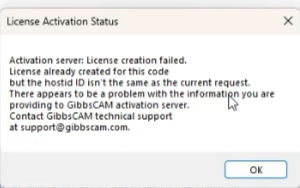
Solutions:
Please check to make sure the USB hardware key is plugged in and is being detected properly. Check the Device Manager to see if it shows up in the Universal Serial Bus Controllers section.
Check to see if there are any warnings in the USB section. If there are, this typically indicates that there are missing Windows components, and this can usually be resolved through Windows updates.
If it is not detecting the key properly you can try getting a clean reinstall of the latest version of the hardware key drivers.
First, run the 'SSD Cleanup' tool to clear out any sentinel drivers currently on the system so you can have a clean install.
Next, download and install the correct hardware key driver for your key:
If the correct driver is already installed, did it ever ask you what type of key you are using (HASP or Sentinel)? If so, which was selected? Their key type is a HASP style key.
Related Articles
GibbsCAM Reprise NLO Server Installation Instructions
Installation of the Network License Option (NLO) is a two-phase process: In Phase 1, you set up the server. In Phase 2, you install and register the client software on each node. GibbsCAM NLO/Network Licensing Video: ...GibbsCAM CimLM Network License Installation
Please note that GibbsCAM CimLM Network server software is only compatible with GibbsCAM 13 to GibbsCAM 2023. For GibbsCAM 2024 or newer version, please install GibbsCAM Reprise NLO Server Installation Instructions. Installation of the Network ...License Deployment Error - Failed Validation Check.
Error: Error communicating with server. License server version may be too old to serve application license. Note: If a client machine cannot connect to the server after registration, ensure that ports 2764 and 2765 are not blocked. GibbsCAM NLO ...NLO Roaming License
NLO License borrowing with checkout/return/expiry parameters Users can now check out an NLO license for 30 days, then disconnect from the network. This allows users to borrow licenses, disconnect, move their laptop, and keep using the GibbsCAM ...The server license is not accessible (GibbsCAM V13-V2023)
Troubleshooting the Client side: 1.) Manually check the client registration worked, which means that the server license file now also resides at this local PC. Check the appropriate folder for your version: v13 - C:\ProgramData\3D ...