Getting the GLC file for Offline Registration

Getting the GLC file for Offline Registration

Getting the GLC File


If the Registration tool determines that the computer cannot directly contact the Gibbs Activation Service and lacks access to e-mail, then the Registration Tool will prompt you to click Finish to save license registration data to a file:


When you click Finish, the Save As dialog prompts you to save your license registration data to a file:


After you save your registration data file, you can send it support@westcam.com.


Offline Registration


After you receive your license file, save it on your computer and launch

GibbsCAM. On first startup, the following dialog appears:
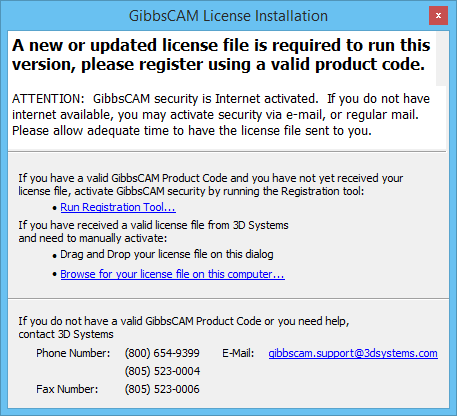

You can either drag and drop the license file onto that dialog or click the Browse for your license file on this computer… link, which opens a dialog that lets you navigate to the file and select it:
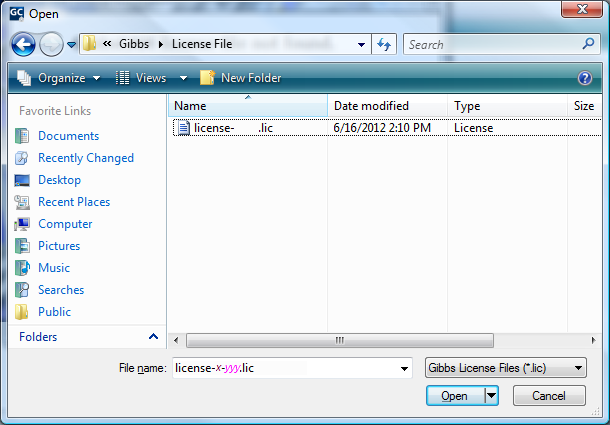

After you locate and open the license file, you should see a message dialog resembling the following:
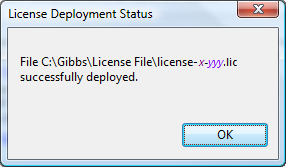

When you click OK, GibbsCAM starts; your installation of GibbsCAM has been authenticated.

    • Related Articles

    • File Explorer Gibbscam thumbnail image preview.

      If file explorer does not show the image preview of gibbs files run this in command prompt as admin. C:\windows\Microsoft.NET\Framework64\v4.0.30319\regasm.exe /codebase "C:\Program Files\Common Files\GibbsCAM Shared\Extensions\GCFilePreviewer.dll"
    • The hostid of this machine doesn't match any license file

      Solutions: Please check to make sure the USB hardware key is plugged in and is being detected properly. Check the Device Manager to see if it shows up in the Universal Serial Bus Controllers section. Check to see if there are any warnings in the USB ...
    • GibbsCAM v25.0.53 Crashing when opening a vnc file

      V25.0.50 does not crash when opening files. V25.0.52 ,53 ,54 all crash when opening files. This might be a bad install of " msvcp140.dll " in the system32 folder. Replacing this file with a known working one can fix this issue. *** The file " ...
    • Autodesk Inventor 2026 File Integration for GibbsCAM 2026

      To import a 2026 Inventor file into GibbsCAM 2026, you now need to install the Autodesk Apprentice Server separately. Simply installing Inventor is no longer enough because Inventor 2026 stopped including this necessary component. Please follow the ...
    • Registering License - not deploying

      If nothing happens when you click "Finish", this indicates that your computer is not giving you permission to overwrite the file that is already in that folder. There are two possible ways to get around this: 1) You can run the Registration Tool in ...